Example: Benchmarking Isolation Forest with Probabilistic Outliers Prediction
Prerequisites
Python 3.12 (recommended)
Files on disk:
database/train_dataset_severson.db(benchmark labels per cycle)database/train_features_severson.db(engineered features per cycle)PIPELINE_OUTPUT_DIR/hyperparams_iforest.csv(An example of tuned hyperparameters per cell for Isolation Forest)
(Optional) LaTeX installation if you want Matplotlib to render text with LaTeX:
A TeX distribution (e.g., TeX Live/MacTeX/MiKTeX), dvipng, and fonts like cm-super.
Don’t have LaTeX installed? Either install it, or set
rcParams["text.usetex"] = False.
Before running the example in the quick_start_tutorials section, please
evaluate whether the global directory path specified in src/osbad/config.py
needs to be updated:
# Modify this global directory path if needed
PIPELINE_OUTPUT_DIR = Path.cwd().joinpath("artifacts_output_dir")
The following example of running a model with probabilistic outlier prediction
is also provided as a notebook in
quick_start_tutorials/02_run_model_tutorial.ipynb.
Step-1: Load libraries
Import the libraries into your local development environment, including the
osbad library for benchmarking anomaly detection.
Pathis used for robust, cross-platform file paths.duckdbis the embedded analytical database engine storing the dataset.fireducks.pandas as pdgives you a pandas-compatible API; you can usually treat it like import pandas as pd.rcParams["text.usetex"] = Truetells Matplotlib to render text via LaTeX. If you don’t have LaTeX installed, flip this to False.bconf: project config utilities (e.g., where to write artifacts).BenchDB: a thin layer around DuckDB that provides convenience loaders.ModelRunner,hp,modval: modeling, hyperparameters, and model validation helpers for benchmarking study in this project.
# Standard library
import os
from pathlib import Path

# Third-party libraries
import duckdb
import fireducks.pandas as pd
import matplotlib.pyplot as plt
from matplotlib import rcParams

rcParams["text.usetex"] = True

# Custom osbad library for benchmarking anomaly detection
import osbad.config as bconf
import osbad.hyperparam as hp
import osbad.modval as modval
from osbad.database import BenchDB
from osbad.model import ModelRunner
Step-2: Load Benchmarking Dataset
Pick a specific cell based on the
cell_index, which identifies the experimental data corresponding to one unique cell.Create an artifacts folder for that cell, where you can save figures, tables, or model outputs related to this cell.
Initialize
BenchDBfor the selected cell and path to the DuckDB file:train_dataset_severson.db.Loads all data related to
selected_cell_labelfrom the training partition.
# Get the cell-ID from unique_cell_index_train
selected_cell_label = "2017-05-12_5_4C-70per_3C_CH17"

# Create a subfolder to store fig output
# corresponding to each cell-index
selected_cell_artifacts_dir = bconf.artifacts_output_dir(
    selected_cell_label)

# Path to the DuckDB file:
# "train_dataset_severson.db"
db_filepath = (
    Path.cwd()
    .parent
    .joinpath("database","train_dataset_severson.db"))

# Import the BenchDB class
# Load only the dataset based on the selected cell
benchdb = BenchDB(
    db_filepath,
    selected_cell_label)

# load the benchmarking dataset
df_selected_cell = benchdb.load_benchmark_dataset(
    dataset_type="train")
Step-3: Load the Features DB
Load the features (e.g.,
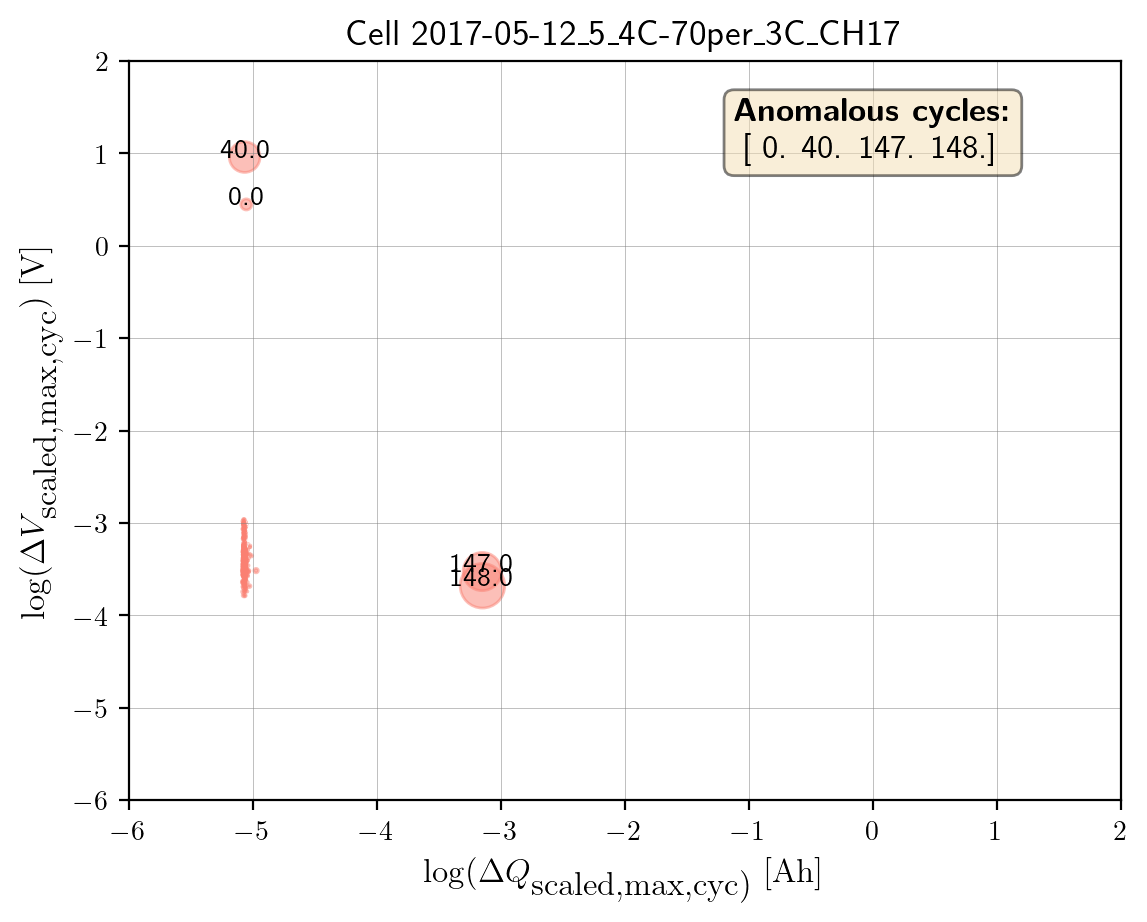
log_max_diff_dQ,log_max_diff_dV) based onselected_cell_labelinBenchDB.To make the chart more informative, bubble sizes are scaled by ratios calculated from the distributions of feature values (
max_diff_dQandmax_diff_dV). Using absolute values ensures all sizes are positive.Plot the bubble chart using the logarithmic features
log_max_diff_dQandlog_max_diff_dVas the x and y axes. Bubble sizes are determined by the calculated ratios. Cycles flagged as outliers are highlighted via their indices.
# Define the filepath to ``train_features_severson.db``
# DuckDB instance.
db_features_filepath = (
    Path.cwd()
    .parent
    .joinpath("database","train_features_severson.db"))

# Load only the training features dataset
df_features_per_cell = benchdb.load_features_db(
    db_features_filepath,
    dataset_type="train")

unique_cycle_count = (
    df_features_per_cell["cycle_index"].unique())

# Calculate the bubble size ratio for plotting
df_bubble_size_dQ = bstats.calculate_bubble_size_ratio(
    df_variable=df_features_per_cell["max_diff_dQ"])

df_bubble_size_dV = bstats.calculate_bubble_size_ratio(
    df_variable=df_features_per_cell["max_diff_dV"])

bubble_size = (
    np.abs(df_bubble_size_dV)
    * np.abs(df_bubble_size_dQ))

# Plot the bubble chart and label the outliers
axplot = bviz.plot_bubble_chart(
    xseries=df_features_per_cell["log_max_diff_dQ"],
    yseries=df_features_per_cell["log_max_diff_dV"],
    bubble_size=bubble_size,
    unique_cycle_count=unique_cycle_count,
    cycle_outlier_idx_label=true_outlier_cycle_index)

axplot.set_title(
    f"Cell {selected_cell_label}", fontsize=13)

axplot.set_xlabel(
    r"$\log(\Delta Q_\textrm{scaled,max,cyc)}\;\textrm{[Ah]}$",
    fontsize=12)
axplot.set_ylabel(
    r"$\log(\Delta V_\textrm{scaled,max,cyc})\;\textrm{[V]}$",
    fontsize=12)

output_fig_filename = (
    "log_bubble_plot_"
    + selected_cell_label
    + ".png")

fig_output_path = (
    selected_cell_artifacts_dir.joinpath(output_fig_filename))

plt.savefig(
    fig_output_path,
    dpi=200,
    bbox_inches="tight")

plt.show()
Step-4: Train model with tuned hyperparameters
Resolves PIPELINE_OUTPUT_DIR and reads
hyperparams_iforest.csvand filters the CSV to the row forselected_cell_label.Extracts the hyperparameter dictionary:
contamination,n_estimators,max_samples,threshold.
Loads the Isolation Forest config from
hp.MODEL_CONFIG["iforest"].Builds a ModelRunner with the cell label, feature DataFrame, and selected features.
Calls
runner.create_model_x_input()to get the X matrix (shape: n_cycles × n_features).Instantiates the model with
cfg.model_param(param_dict), fits it, and computes probabilities with predict_proba.Converts probabilities into outlier indices and associated outlier scores.
# Access the global filepath variable PIPELINE_OUTPUT_DIR defined
# in config.py
PIPELINE_OUTPUT_DIR = bconf.PIPELINE_OUTPUT_DIR

# Read hyperparameters from the stored artifacts
hyperparam_filepath =  PIPELINE_OUTPUT_DIR.joinpath(
    "hyperparams_iforest.csv")
df_hyperparam_from_csv = pd.read_csv(hyperparam_filepath)

# Filter for the selected_cell_label
df_param_per_cell = df_hyperparam_from_csv[
    df_hyperparam_from_csv["cell_index"] == selected_cell_label]

# Hyperparameters for Isolation Forest
param_dict = {
    "contamination": df_param_per_cell["contamination"].values[0],
    "n_estimators": df_param_per_cell["n_estimators"].values[0],
    "max_samples": df_param_per_cell["max_samples"].values[0],
    "threshold": df_param_per_cell["threshold"].values[0]}


# Extract the model configuration for Isolation Forest
# Note: the dict key for Isolation Forest is iforest
cfg = hp.MODEL_CONFIG["iforest"]

# The two features implemented in this example
selected_feature_cols = (
    "log_max_diff_dQ",
    "log_max_diff_dV")

# Create a ModelRunner instance based on selected_cell_label,
# df_features_per_cell and
# selected_feature_cols
runner = ModelRunner(
    cell_label=selected_cell_label,
    df_input_features=df_features_per_cell,
    selected_feature_cols=selected_feature_cols
)

# Create the training input
Xdata = runner.create_model_x_input()

# Create the model based on the configured hyperparameters
model = cfg.model_param(param_dict)
print(model)

# Fit the model and get probabilistic outliers prediction
model.fit(Xdata)
proba = model.predict_proba(Xdata)

# Get the predicted outlier indices (pred_outlier_indices)
# pred_outlier_indices correspond to predicted anomalous cycles in the
# first example
(pred_outlier_indices,
 pred_outlier_score) = runner.pred_outlier_indices_from_proba(
    proba=proba,
    threshold=param_dict["threshold"],
    outlier_col=cfg.proba_col
)
Step-5: Predict Probabilistic Anomaly Score Map
pred_outlier_indicesis a list of cycle indices predicted as anomalous by the Isolation Forest model. Using.isin(), we filter the dataframe to keep only the cycles identified as anomalies.A new column,
outlier_prob, is added to store the outliers probability computed by the model, making it easy to track how confidently the algorithm flags each cycle.runner.predict_anomaly_score_mapgenerates a 2D contour map of anomaly scores (outlier probability).
# Filter the selected features based on predicted outlier indices
df_outliers_pred = df_features_per_cell[
    df_features_per_cell["cycle_index"].isin(pred_outlier_indices)].copy()

df_outliers_pred["outlier_prob"] = pred_outlier_score

# Plot the anomaly score map
axplot = runner.predict_anomaly_score_map(
  selected_model=model,
  model_name="Isolation Forest",
  xoutliers=df_outliers_pred["log_max_diff_dQ"],
  youtliers=df_outliers_pred["log_max_diff_dV"],
  pred_outliers_index=pred_outlier_indices,
  threshold=param_dict["threshold"])
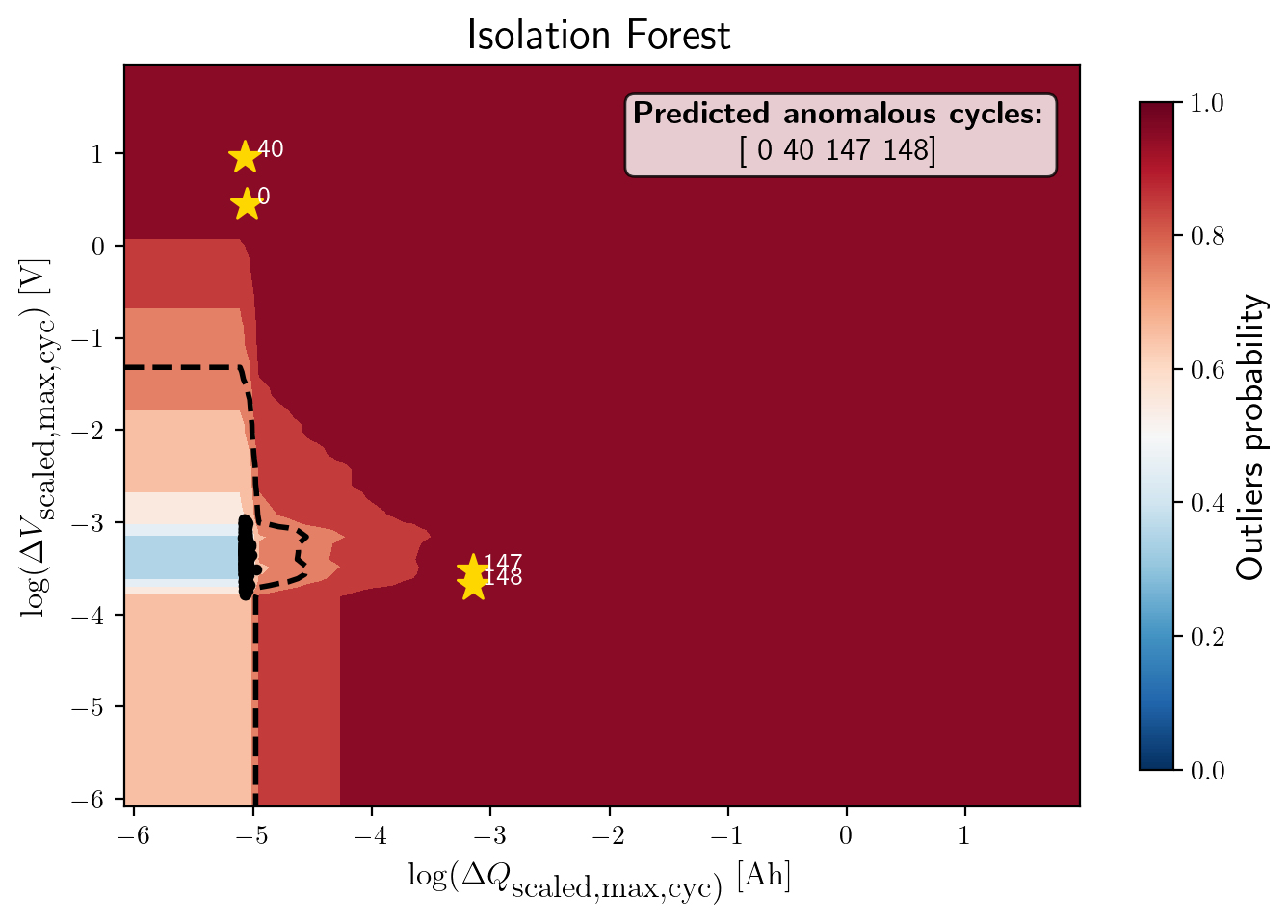
The figure shows the anomaly score map produced by the Isolation Forest model:
Background Heatmap:
Red regions: high anomaly probability (more likely to contain outliers).
Blue/white regions: low anomaly probability (normal cycles).
Dashed Black Contour:
Represents the decision boundary defined by the Isolation Forest threshold. Points outside are considered anomalies.
Black Dots:
Represent the majority of normal cycles (inlier data).
Yellow Stars with Labels:
Mark the detected anomalous cycles (0, 40, 147, 148).
Their positions in the 2D feature space highlight where they deviate from typical battery behavior.
Colorbar (right):
Quantifies anomaly probability (0 = normal, 1 = highly anomalous).
Annotation Box:
Summarizes the predicted anomalous cycles.
Cycles 0 and 40 show unusually high voltage deviations, while 147 and 148 show strong deviations in charge capacity. These anomalies might correspond to specific battery degradation events, sensor errors, or experimental disturbances.
Step-6: Model performance evaluation
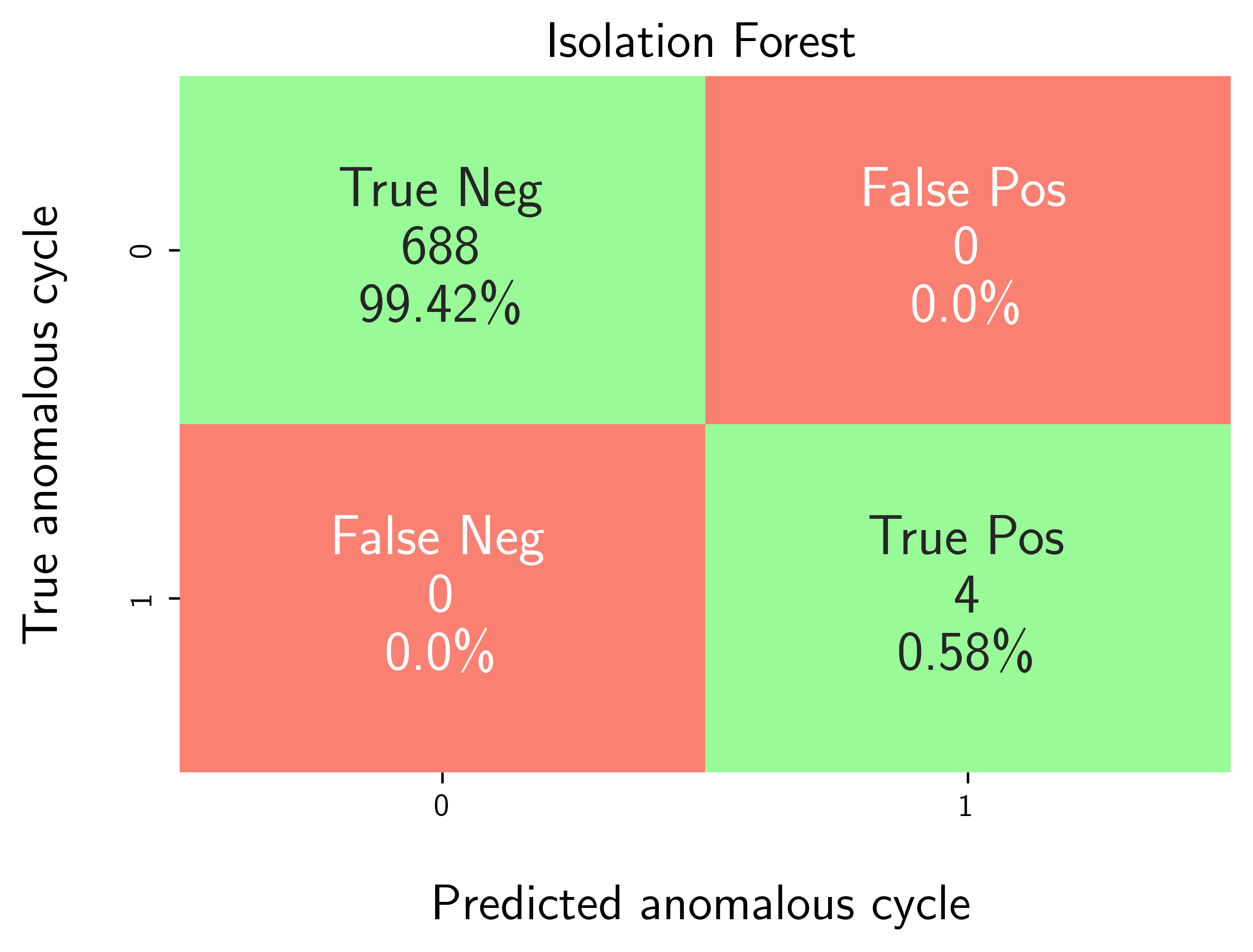
Map predicted outlier indices to the benchmark dataset:
df_selected_cellholds cycle-level records and the ground-truth label (e.g.,outlier= 1 for anomalous cycles, else 0).pred_outlier_indicesis the list of cycle indices flagged by the model.
modval.evaluate_pred_outliers(...)returns a tidy DataFrame with:cycle_index: Cell discharge cycle indextrue_outlier: ground truth (0/1).pred_outlier: model prediction (0/1) for the same cycles.
modval.generate_confusion_matrix(...)aggregates counts of:True Negative (TN): predicted 0, truth 0.False Positive (FP): predicted 1, truth 0.False Negative (FN): predicted 0, truth 1.True Positive (TP): predicted 1, truth 1.
# Map the predicted outlier indices
df_eval_outlier = modval.evaluate_pred_outliers(
  df_benchmark=df_selected_cell,
  outlier_cycle_index=pred_outlier_indices)

# Confusion matrix
axplot = modval.generate_confusion_matrix(
    y_true=df_eval_outlier["true_outlier"],
    y_pred=df_eval_outlier["pred_outlier"])

axplot.set_title(
    "Isolation Forest",
    fontsize=16)

output_fig_filename = (
    "conf_matrix_iforest_"
    + selected_cell_label
    + ".png")

fig_output_path = (
    selected_cell_artifacts_dir
    .joinpath(output_fig_filename))

plt.savefig(
    fig_output_path,
    dpi=600,
    bbox_inches="tight")

plt.show()

# Evaluate model performance
df_current_eval_metrics = modval.eval_model_performance(
    model_name="iforest",
    selected_cell_label=selected_cell_label,
    df_eval_outliers=df_eval_outlier)