Example (2): Isolation Forest with Hyperparameter Tuning
Prerequisites
Python 3.12 (recommended)
Files on disk:
database/train_dataset_severson.db(benchmark labels per cycle)database/train_features_severson.db(precomputed features per cycle)
(Optional) LaTeX installation if you want Matplotlib to render text with LaTeX:
A TeX distribution (e.g., TeX Live/MacTeX/MiKTeX), dvipng, and fonts like cm-super.
Don’t have LaTeX installed? Either install it, or set
rcParams["text.usetex"] = False.
Before running the example in the
machine_learning/hp_tuning_with_transfer_learning section, please
evaluate whether the global directory path specified in
src/osbad/config.py needs to be updated:
# Modify this global directory path if needed
PIPELINE_OUTPUT_DIR = Path.cwd().joinpath("artifacts_output_dir")
The following example of running an Isolation Forest model with
hyperparameter tuning is also provided as a notebook in
machine_learning/hp_tuning_with_transfer_learning/severson_data_source/01_train_dataset/ml_01_iforest_hyperparam_severson.ipynb.
Step-1: Load libraries
Import the libraries into your local development environment, including the
osbad library for benchmarking anomaly detection.
Pathis used for robust, cross-platform file paths.pprintpretty-prints data structures for readable diagnostics.duckdbis the embedded analytical database engine storing the dataset.optunais a hyperparameter optimization framework used to search for the best model configuration.bconf: project config utilities (e.g., where to write artifacts).hp: hyperparameter tuning utilities including the objective function, aggregation of best trials, and Pareto front visualization.BenchDB: a thin layer around DuckDB that provides convenience loaders.ModelRunner,modval,bviz: modeling, model validation, and visualization helpers for the benchmarking study.
# Standard library
from pathlib import Path
import pprint

# Third-party libraries
import duckdb
import pandas as pd
import matplotlib.pyplot as plt
import numpy as np
import optuna

# Custom osbad library for anomaly detection
import osbad.config as bconf
import osbad.hyperparam as hp
import osbad.modval as modval
import osbad.viz as bviz
from osbad.database import BenchDB
from osbad.model import ModelRunner
Step-2: Load Benchmarking Dataset
Define the path to the DuckDB database file using the
DB_DIRfrombconf.Create a DuckDB connection (read-only) and load the full training dataset from the
df_train_dataset_svtable.Retrieve the unique cell indices available in the training dataset.
# Define a global variable to save fig output
PIPELINE_OUTPUT_DIR = bconf.PIPELINE_OUTPUT_DIR

# Path to database directory
DB_DIR = bconf.DB_DIR

# Path to the DuckDB instance:
# "osbad/database/train_dataset_severson.db"
db_filepath = (
    DB_DIR.joinpath("train_dataset_severson.db"))

# Create a DuckDB connection
con = duckdb.connect(
    db_filepath,
    read_only=True)

# Load all training dataset from duckdb
df_duckdb = con.execute(
    "SELECT * FROM df_train_dataset_sv").fetchdf()

# Get the cell index of training dataset
unique_cell_index_train = df_duckdb["cell_index"].unique()
print(unique_cell_index_train)
training_cell_count = len(unique_cell_index_train)
print(f"Training cell count: {training_cell_count}")
Step-3: Filter Dataset for a Selected Cell
Pick a specific cell based on
selected_cell_label, which identifies the experimental data corresponding to one unique cell.Create an artifacts folder for that cell, where you can save figures, tables, or model outputs related to this cell.
# Get the cell-ID from cell_inventory
selected_cell_label = "2017-05-12_5_4C-70per_3C_CH17"

# Create a subfolder to store fig output
# corresponding to each cell-index
selected_cell_artifacts_dir = bconf.artifacts_output_dir(
    selected_cell_label)
Step-4: Load Benchmarking Dataset for Selected Cell
Initialize
BenchDBfor the selected cell and load the benchmarking dataset from the training partition.
# Import the BenchDB class
# Load only the dataset based on the selected cell
benchdb = BenchDB(
    db_filepath,
    selected_cell_label)

# load the benchmarking dataset
df_selected_cell = benchdb.load_benchmark_dataset(
    dataset_type="train")
Step-5: Drop True Labels
Drop the true outlier labels (denoted as
outlier) from the dataframe and select only the relevant features for machine learning:cell_index: The cell-ID for data and model versioning purposes.cycle_index: The cycle number of each cell.discharge_capacity: Discharge capacity of the cell.voltage: Discharge voltage of the cell.
if df_selected_cell is not None:

    filter_col = [
        "cell_index",
        "cycle_index",
        "discharge_capacity",
        "voltage"]

    # Drop true labels from the benchmarking dataset
    # and filter for selected columns only
    df_selected_cell_without_labels = benchdb.drop_labels(
        df_selected_cell,
        filter_col)

    # print a subset of the dataframe
    # for diagnostics running in terminals
    print(df_selected_cell_without_labels.head(10).to_markdown())
    print("*"*100)
Step-6: Plot Cycle Data without Labels
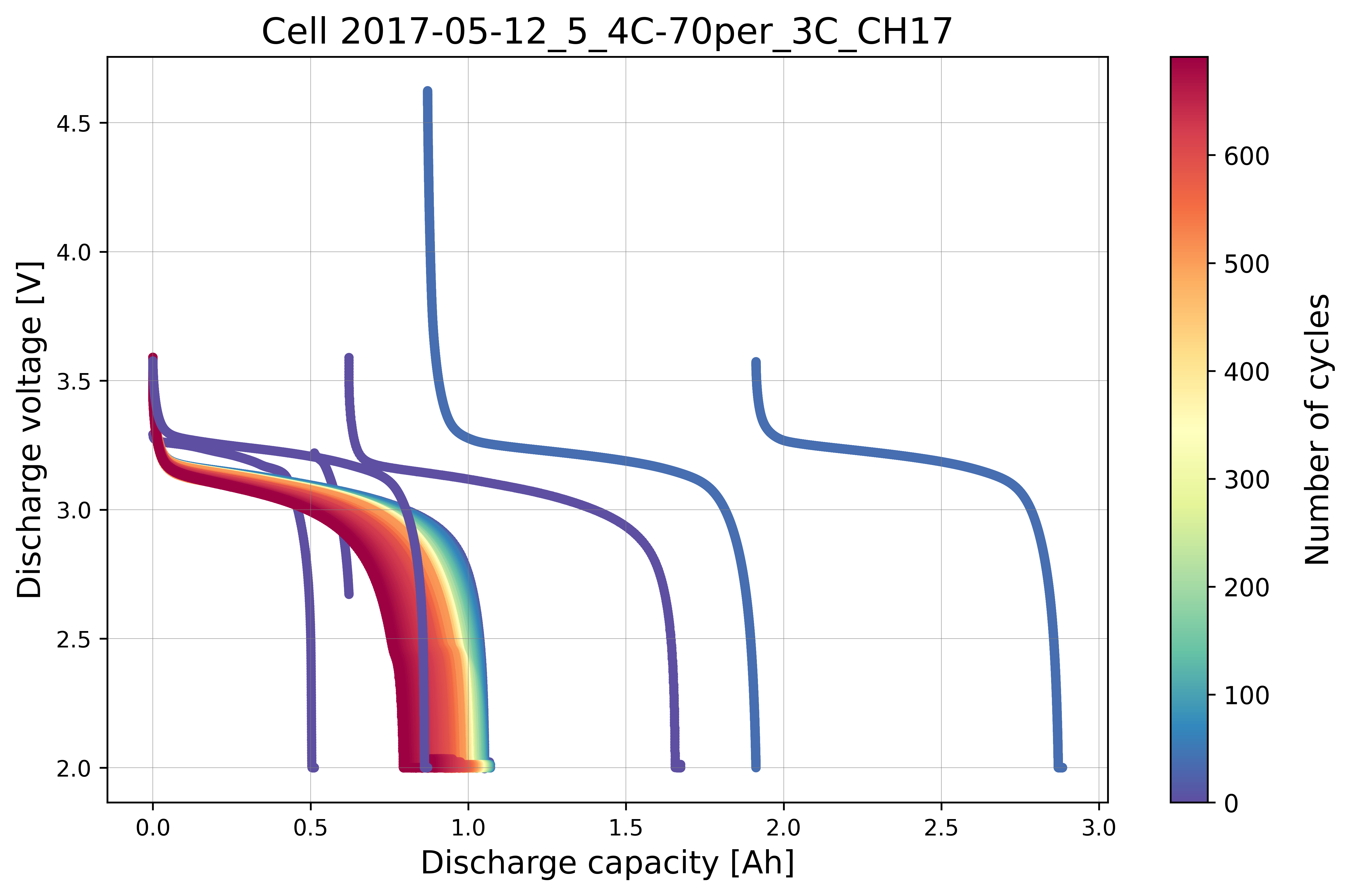
Visualize the cycling data for the selected cell without displaying the true outlier labels. This represents what the model sees before training.
# If the true outlier cycle index is not known,
# cycling data will be plotted without labels
benchdb.plot_cycle_data(
    df_selected_cell_without_labels)

output_fig_filename = (
    "cycle_data_without_labels_"
    + selected_cell_label
    + ".png")

fig_output_path = (
    selected_cell_artifacts_dir
    .joinpath(output_fig_filename))

plt.savefig(
    fig_output_path,
    dpi=600,
    bbox_inches="tight")

plt.show()
Step-7: Load the Pre-computed Training Features
Instead of computing the statistical feature transformation and physics-informed feature extraction from scratch (as in the baseline example), the hyperparameter tuning workflow loads pre-computed features directly from a dedicated features database. This database stores the already-transformed features per cycle, including:
max_diff_dQ: Maximum scaled capacity difference per cycle.log_max_diff_dQ: Log-transformed maximum scaled capacity difference.max_diff_dV: Maximum scaled voltage difference per cycle.log_max_diff_dV: Log-transformed maximum scaled voltage difference.
# Define the filepath to ``train_features_severson.db``
# osbad/database/train_features_severson.db
db_features_filepath = (
    DB_DIR.joinpath(
        "train_features_severson.db"))

# Load only the training features dataset
df_features_per_cell = benchdb.load_features_db(
    db_features_filepath,
    dataset_type="train")

unique_cycle_count = (
    df_features_per_cell["cycle_index"].unique())
To inspect the loaded features:
df_features_per_cell
Step-8: Hyperparameter Tuning with Optuna
Optuna is used to search for the best hyperparameters of the Isolation Forest model. The multi-objective optimization maximizes both recall and precision simultaneously.
Define the hyperparameter search space
The hyperparameter search space is defined as a lambda function that maps
each Optuna trial to a dictionary of sampled hyperparameter values:
contamination: Expected proportion of outliers in the dataset (float, 0 to 0.5).n_estimators: Number of isolation trees in the ensemble (int, 100 to 500).max_samples: Maximum number of samples to draw for each tree (int, 100 to total cycle count).threshold: Decision threshold for the outlier probability score (float, 0 to 1).
# Update the HP config for max_samples
# depending on the cycle numbers
total_cycle_count = len(
    df_selected_cell_without_labels["cycle_index"].unique())

# Define the hyperparameter search space for
# isolation forest
hp_space=lambda trial: {
    "contamination": trial.suggest_float(
        "contamination", 0, 0.5),
    "n_estimators": trial.suggest_int(
        "n_estimators", 100, 500),
    "max_samples": trial.suggest_int(
        "max_samples", 100, total_cycle_count),
    "threshold": trial.suggest_float(
        "threshold", 0, 1)}
Create and run the Optuna study
A
TPESamplerwith a fixed seed ensures reproducibility.The study is configured for multi-objective optimization with two directions set to
maximize(recall and precision).The
hp.objectivefunction trains the Isolation Forest model for each trial and evaluates it against the benchmarking dataset.
# Instantiate an optuna study for iForest model
sampler = optuna.samplers.TPESampler(seed=42)

selected_feature_cols = (
    "log_max_diff_dQ",
    "log_max_diff_dV")

if_study = optuna.create_study(
    study_name="iforest_hyperparam",
    sampler=sampler,
    directions=["maximize","maximize"])

if_study.optimize(
    lambda trial: hp.objective(
        trial,
        model_id="iforest",
        df_feature_dataset=df_features_per_cell,
        selected_feature_cols=selected_feature_cols,
        df_benchmark_dataset=df_selected_cell,
        hp_space=hp_space,
        selected_cell_label=selected_cell_label),
    n_trials=20)
Step-9: Aggregate Best Trials
After the optimization completes, aggregate the best trial hyperparameters using the median (or median rounded to integer for discrete parameters). The aggregation schema defines how each hyperparameter is consolidated across the Pareto-optimal trials:
schema_iforest = {
    "threshold": "median",
    "contamination": "median",
    "n_estimators": "median_int",
    "max_samples": "median_int",
}

df_iforest_hyperparam = hp.aggregate_best_trials(
    if_study.best_trials,
    cell_label=selected_cell_label,
    model_id="iforest",
    schema=schema_iforest)

df_iforest_hyperparam
Step-10: Evaluate Percentage of Perfect Recall and Precision
Evaluate the percentage of trials in the study that achieved a perfect recall score (= 1.0) and a perfect precision score (= 1.0).
This provides insight into how frequently the optimization found configurations that correctly identified all anomalies without any false positives.
recall_score_pct, precision_score_pct = hp.evaluate_hp_perfect_score_pct(
    model_study=if_study)
Step-11: Plot Pareto Front
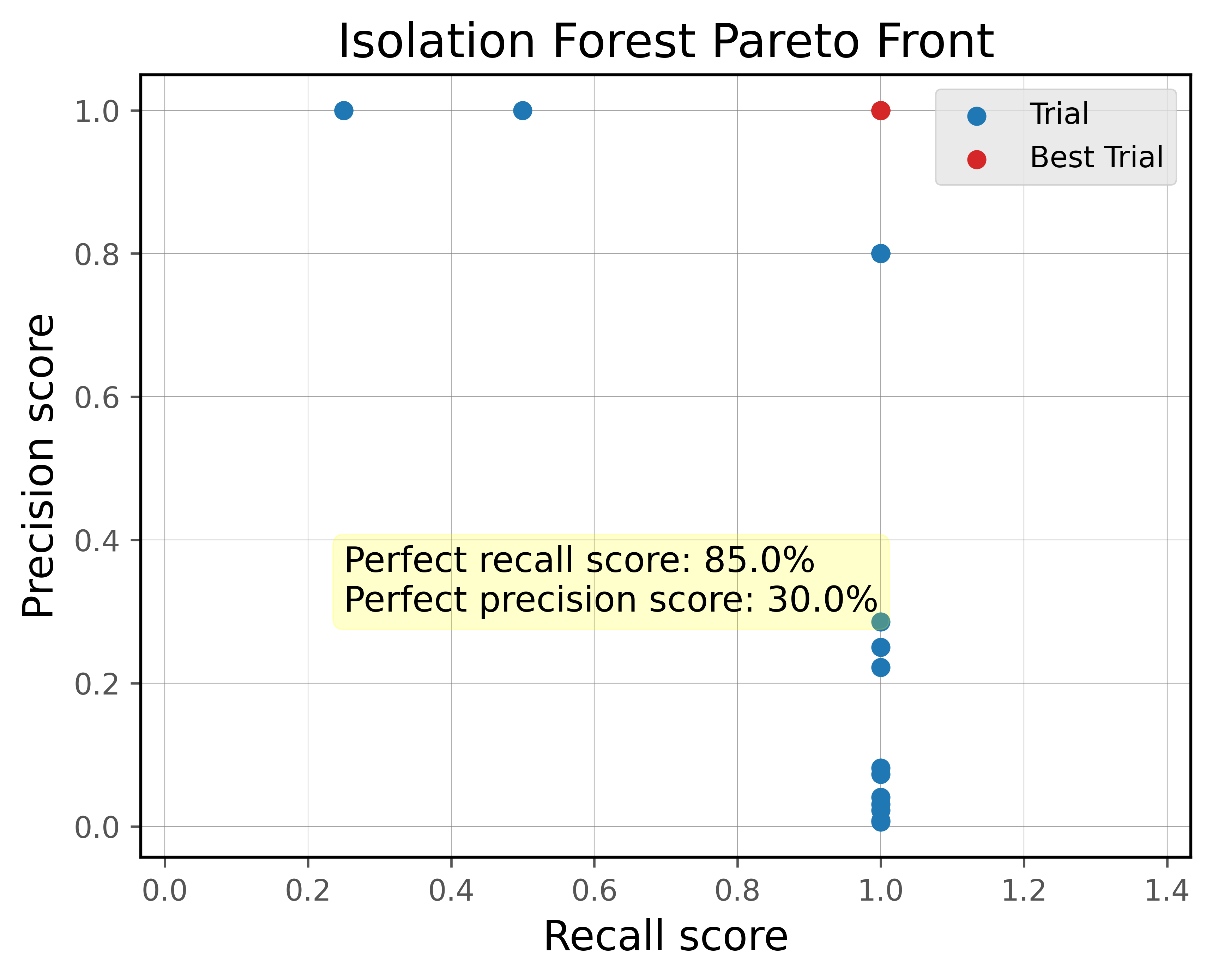
The Pareto front visualizes the trade-off between recall and precision across all trials.
Trials on the Pareto front represent the best achievable combinations of recall and precision: improving one metric would require sacrificing the other.
hp.plot_pareto_front(
    if_study,
    selected_cell_label,
    fig_title="Isolation Forest Pareto Front")

plt.show()
Step-12: Export Hyperparameters to CSV
Export the aggregated best hyperparameters to a CSV file for record-keeping and reproducibility.
The
if_exists="replace"option overwrites any existing entry for the selected cell.
# Export current hyperparameters to CSV
hyperparam_filepath =  Path.cwd().joinpath(
    "ml_01_iforest_hyperparam_severson.csv")

hp.export_current_hyperparam(
    df_iforest_hyperparam,
    selected_cell_label,
    export_csv_filepath=hyperparam_filepath,
    if_exists="replace")
Step-13: Train Model with Best Trial Parameters
Load best trial parameters from CSV output
Read back the exported hyperparameters from CSV and filter for the selected cell.
# Test reading from exported metrics
df_hyperparam_from_csv = pd.read_csv(hyperparam_filepath)

df_param_per_cell = df_hyperparam_from_csv[
    df_hyperparam_from_csv["cell_index"] == selected_cell_label]
df_param_per_cell
Create a dict for best trial parameters
param_dict = df_param_per_cell.iloc[0].to_dict()
pprint.pp(param_dict)
Run the model with best trial parameters
Extract the model configuration for Isolation Forest from
hp.MODEL_CONFIG.Instantiate a
ModelRunnerwith the selected features and cell label.Build the training input matrix
Xdata(shape: n_cycles × n_features).Create the Isolation Forest model using the tuned hyperparameters via
cfg.model_param(param_dict).Fit the model, compute probabilistic outlier scores, and extract the predicted outlier cycle indices using the tuned threshold.
cfg = hp.MODEL_CONFIG["iforest"]

runner = ModelRunner(
    cell_label=selected_cell_label,
    df_input_features=df_features_per_cell,
    selected_feature_cols=selected_feature_cols
)

Xdata = runner.create_model_x_input()

model = cfg.model_param(param_dict)
print(model)
model.fit(Xdata)
proba = model.predict_proba(Xdata)

pred_outlier_indices, pred_outlier_score = runner.pred_outlier_indices_from_proba(
    proba=proba,
    threshold=param_dict["threshold"],
    outlier_col=cfg.proba_col
)

pred_outlier_indices, pred_outlier_score
Get predicted outlier dataframe
Filter the feature dataframe to retain only cycles predicted as anomalous.
Append the
outlier_probcolumn with the model’s outlier probability for each predicted anomalous cycle.
df_outliers_pred = (df_features_per_cell[
    df_features_per_cell["cycle_index"]
    .isin(pred_outlier_indices)].copy())

df_outliers_pred["outlier_prob"] = pred_outlier_score
df_outliers_pred
Step-14: Predict Probabilistic Anomaly Score Map
runner.predict_anomaly_score_mapgenerates a 2D contour map of anomaly scores (outlier probability).The anomaly score map uses the tuned threshold from the hyperparameter optimization instead of a fixed value.
axplot = runner.predict_anomaly_score_map(
    selected_model=model,
    model_name="Isolation Forest",
    xoutliers=df_outliers_pred["log_max_diff_dQ"],
    youtliers=df_outliers_pred["log_max_diff_dV"],
    pred_outliers_index=pred_outlier_indices,
    threshold=param_dict["threshold"]
)

axplot.set_xlabel(
     r"$\log(\Delta Q_{\mathrm{scaled,max,cyc}})$ [Ah]",
     fontsize = 12)

axplot.set_ylabel(
     r"$\log(\Delta V_{\mathrm{scaled,max,cyc}})$ [V]",
     fontsize = 12)

output_fig_filename = (
    "iforest_"
    + selected_cell_label
    + ".png")

fig_output_path = (
    selected_cell_artifacts_dir
    .joinpath(output_fig_filename))

plt.savefig(
    fig_output_path,
    dpi=600,
    bbox_inches="tight")

plt.show()
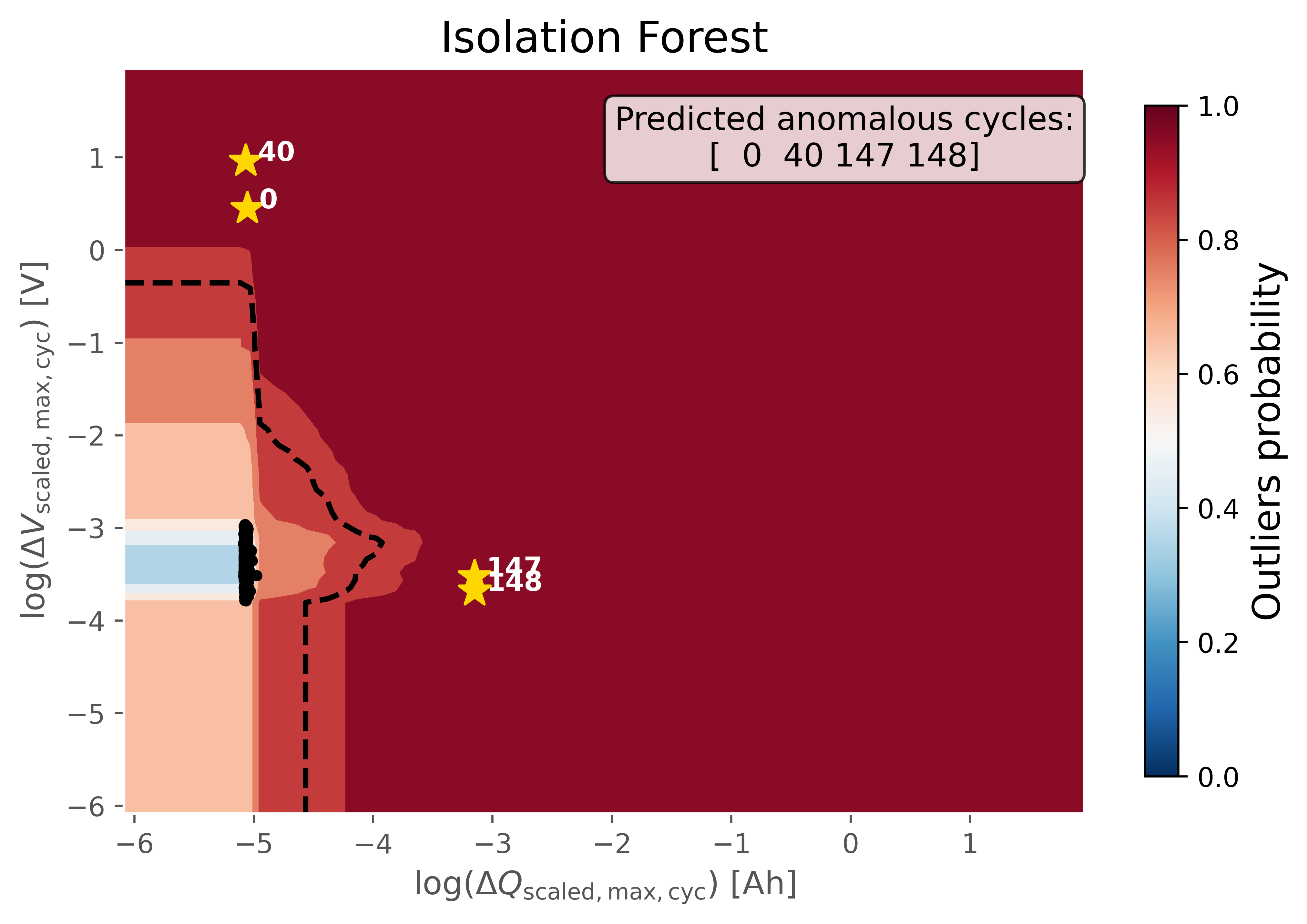
The figure shows the anomaly score map produced by the hyperparameter-tuned Isolation Forest model:
Background Heatmap:
Red regions: high anomaly probability (more likely to contain outliers).
Blue/white regions: low anomaly probability (normal cycles).
Dashed Black Contour:
Represents the decision boundary defined by the optimized threshold. Points outside are considered anomalies.
Black Dots:
Represent the majority of normal cycles (inlier data).
Yellow Stars with Labels:
Mark the detected anomalous cycles. Their positions in the 2D feature space highlight where they deviate from typical battery behavior.
Colorbar (right):
Quantifies anomaly probability (0 = normal, 1 = highly anomalous).
Step-15: Model Performance Evaluation
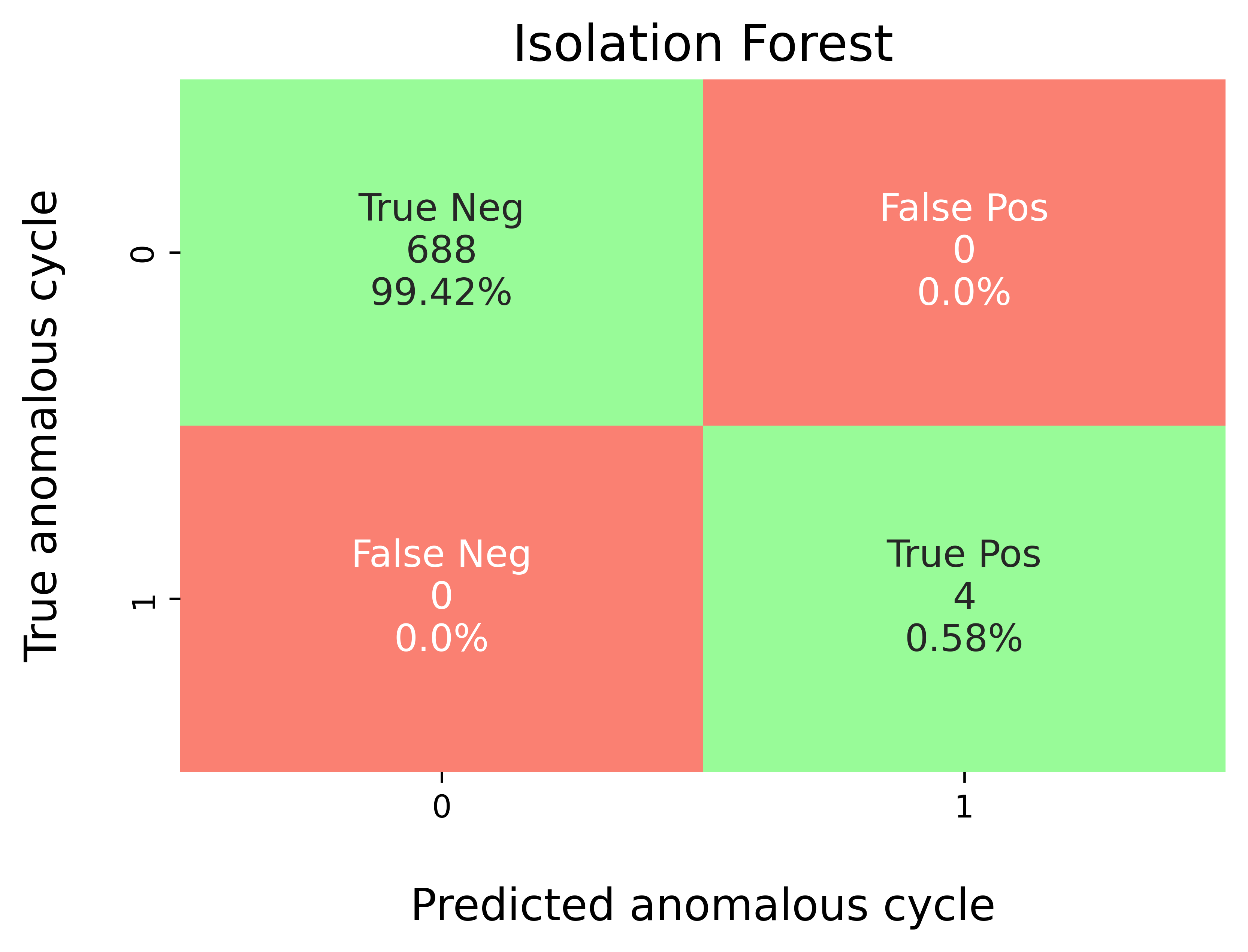
Map predicted outlier indices to the benchmark dataset to compare against ground-truth labels.
modval.evaluate_pred_outliers(...)returns a tidy DataFrame with:cycle_index: Cell discharge cycle index.true_outlier: ground truth (0/1).pred_outlier: model prediction (0/1) for the same cycles.
df_eval_outlier = modval.evaluate_pred_outliers(
    df_benchmark=df_selected_cell,
    outlier_cycle_index=pred_outlier_indices)
Confusion matrix
axplot = modval.generate_confusion_matrix(
    y_true=df_eval_outlier["true_outlier"],
    y_pred=df_eval_outlier["pred_outlier"])

axplot.set_title(
    "Isolation Forest",
    fontsize=16)

output_fig_filename = (
    "conf_matrix_iforest_"
    + selected_cell_label
    + ".png")

fig_output_path = (
    selected_cell_artifacts_dir
    .joinpath(output_fig_filename))

plt.savefig(
    fig_output_path,
    dpi=600,
    bbox_inches="tight")

plt.show()
Evaluation metrics
In this study, five different metrics are used to evaluate model performance:
Accuracy: \(\frac{\textrm{TP} + \textrm{TN}}{\textrm{Total prediction}}\)
Precision: \(\frac{\textrm{TP}}{\textrm{TP + FP}}\)
Recall: \(\frac{\textrm{TP}}{\textrm{TP + FN}}\)
F1-score: \(\frac{2(\textrm{Precision}\times \textrm{Recall})}{\textrm{Precision} + \textrm{Recall}}\)
MCC: \(\frac{TP \times TN - FP \times FN}{\sqrt{(TP + FP)(TP + FN)(TN + FP)(TN+FN)}}\)
df_current_eval_metrics = modval.eval_model_performance(
    model_name="iforest",
    selected_cell_label=selected_cell_label,
    df_eval_outliers=df_eval_outlier)

df_current_eval_metrics
Step-16: Export Model Performance Metrics
Export the evaluation metrics to a CSV file for record-keeping and comparison across models and cells.
# Export current metrics to CSV
hyperparam_eval_filepath =  Path.cwd().joinpath(
    "eval_metrics_hp_single_cell_severson.csv")

hp.export_current_model_metrics(
    model_name="iforest",
    selected_cell_label=selected_cell_label,
    df_current_eval_metrics=df_current_eval_metrics,
    export_csv_filepath=hyperparam_eval_filepath,
    if_exists="replace")
Step-17: Verify with True Labels
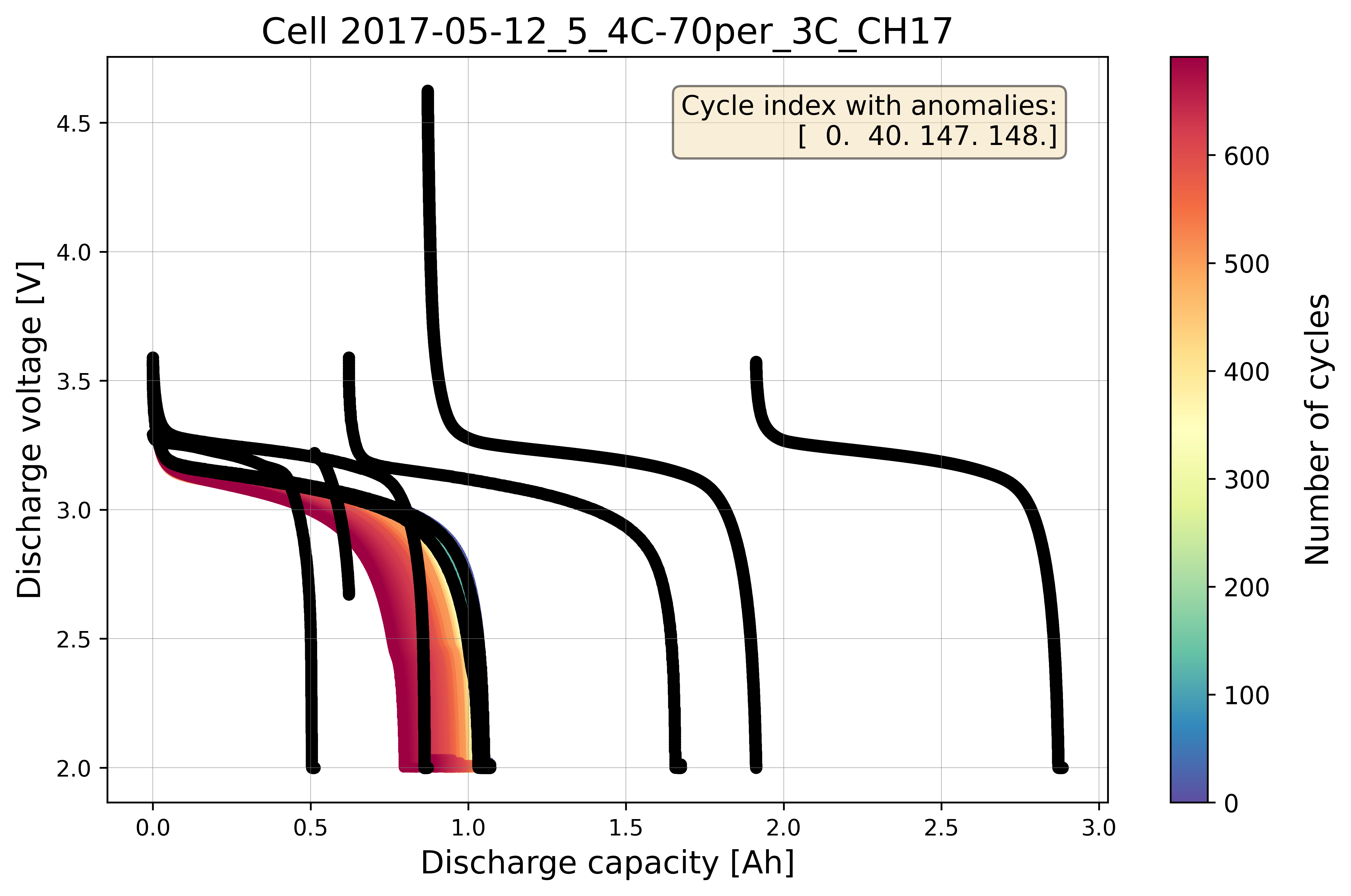
Plot cycle data with labels
Extract the true outlier cycle indices from the benchmarking dataset.
Re-plot the cycling data with the true anomalous cycles highlighted and annotated, allowing visual comparison of model predictions against the ground truth.
# Extract true outliers cycle index from benchmarking dataset
true_outlier_cycle_index = benchdb.get_true_outlier_cycle_index(
    df_selected_cell)
print(f"True outlier cycle index:")
print(true_outlier_cycle_index)

# Plot cell data with true anomalies
# If the true outlier cycle index is not known,
# cycling data will be plotted without labels
benchdb.plot_cycle_data(
    df_selected_cell_without_labels,
    true_outlier_cycle_index)

output_fig_filename = (
    "cycle_data_with_labels_"
    + selected_cell_label
    + ".png")

fig_output_path = (
    selected_cell_artifacts_dir.joinpath(output_fig_filename))

plt.savefig(
    fig_output_path,
    dpi=600,
    bbox_inches="tight")

plt.show()
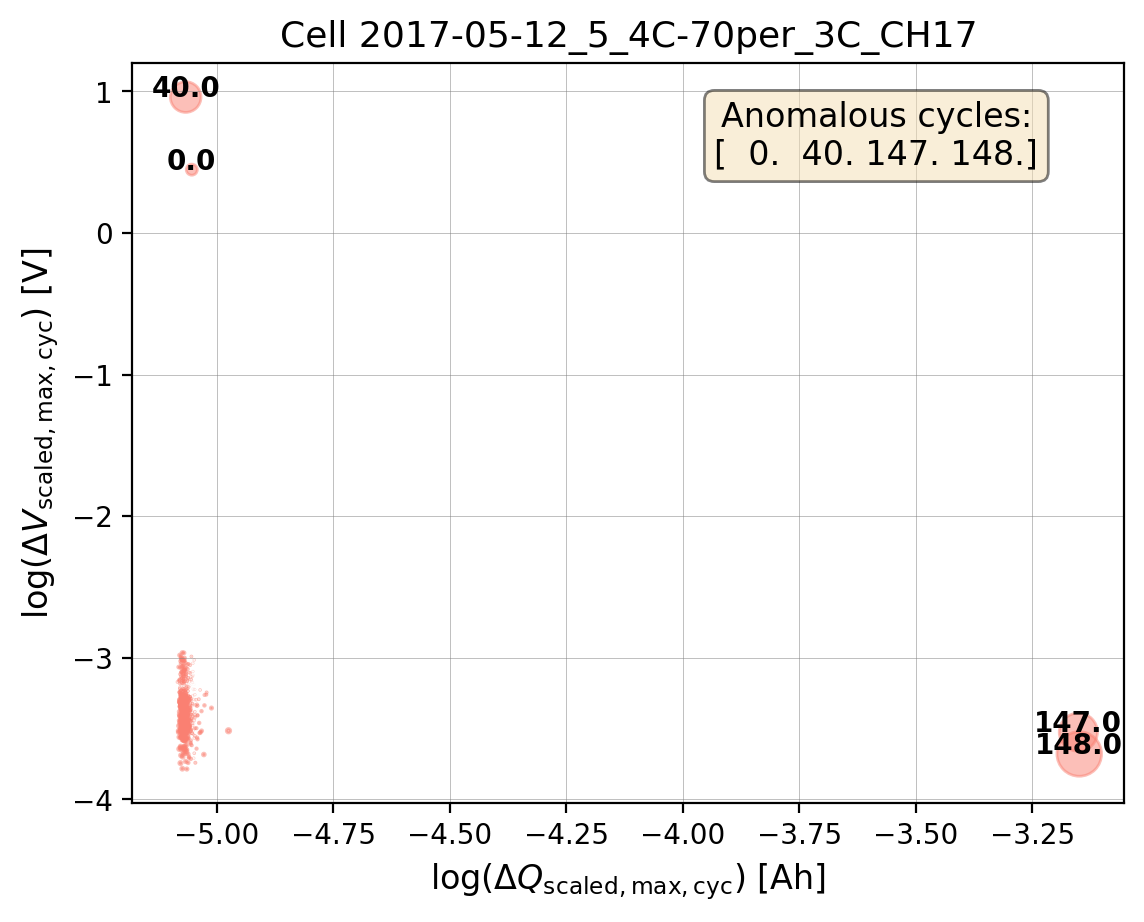
Calculate bubble size ratio
Calculate the bubble size ratios from the feature distributions for plotting. The bubble size encodes the magnitude of both the capacity and voltage differences, making it easier to identify anomalous cycles visually.
# Calculate the bubble size ratio for plotting
df_bubble_size_dQ = bviz.calculate_bubble_size_ratio(
    df_variable=df_features_per_cell["max_diff_dQ"])

df_bubble_size_dV = bviz.calculate_bubble_size_ratio(
    df_variable=df_features_per_cell["max_diff_dV"])

bubble_size = (
    np.abs(df_bubble_size_dV)
    * np.abs(df_bubble_size_dQ))
Plot the bubble chart with true outlier labels
# Plot the bubble chart and label the outliers
axplot = bviz.plot_bubble_chart(
    xseries=df_features_per_cell["log_max_diff_dQ"],
    yseries=df_features_per_cell["log_max_diff_dV"],
    bubble_size=bubble_size,
    unique_cycle_count=unique_cycle_count,
    cycle_outlier_idx_label=true_outlier_cycle_index)

axplot.set_title(
    f"Cell {selected_cell_label}", fontsize=13)

axplot.set_xlabel(
     r"$\log(\Delta Q_{\mathrm{scaled,max,cyc}})$ [Ah]",
     fontsize = 12)

axplot.set_ylabel(
     r"$\log(\Delta V_{\mathrm{scaled,max,cyc}})$ [V]",
     fontsize = 12)

output_fig_filename = (
    "log_bubble_plot_"
    + selected_cell_label
    + ".png")

fig_output_path = (
    selected_cell_artifacts_dir.joinpath(output_fig_filename))

plt.savefig(
    fig_output_path,
    dpi=200,
    bbox_inches="tight")

plt.show()
Note
This notebook serves as an example to explain the workflow for running the Isolation Forest model with hyperparameter tuning on a single cell. To mitigate overfitting, the model should be trained and validated across all 23 different cells in the training dataset instead of a single cell (see ml_01_iforest_hyperparam_pipeline_severson.py).
The hyperparameters are then averaged across all cells to find a more generalizable configuration that performs well across the entire dataset, rather than just one cell (see ml_01_iforest_export_model.py).