Example (3): Baseline Autoencoder without Hyperparameter Tuning (Tohoku Dataset)
Prerequisites
Python 3.12 (recommended)
Files on disk:
database/tohoku_benchmark_dataset.db(benchmark labels per cycle)
(Optional) LaTeX installation if you want Matplotlib to render text with LaTeX:
A TeX distribution (e.g., TeX Live/MacTeX/MiKTeX), dvipng, and fonts like cm-super.
Don’t have LaTeX installed? Either install it, or set
rcParams["text.usetex"] = False.
Before running the example in the machine_learning/baseline_models
section, please evaluate whether the global directory path specified in
src/osbad/config.py needs to be updated:
# Modify this global directory path if needed
PIPELINE_OUTPUT_DIR = Path.cwd().joinpath("artifacts_output_dir")
The following example of running a baseline Autoencoder model (without
hyperparameter tuning) is also provided as a notebook in
machine_learning/baseline_models/tohoku_data_source/ml_06_autoencoder_baseline_tohoku.ipynb.
Step-1: Load libraries
Import the libraries into your local development environment, including the
osbad library for benchmarking anomaly detection.
Pathis used for robust, cross-platform file paths.pprintpretty-prints data structures for readable diagnostics.duckdbis the embedded analytical database engine storing the dataset.EmpiricalCovariancefrom sklearn is used to calculate Mahalanobis distance for feature engineering.bconf: project config utilities (e.g., where to write artifacts).BenchDB: a thin layer around DuckDB that provides convenience loaders.CycleScaling: implements the statistical feature transformation methods for scaling cycle data.ModelRunner,hp,modval,bviz: modeling, hyperparameters, model validation, and visualization helpers for the benchmarking study.
# Standard library
from pathlib import Path
import pprint

# Third-party libraries
import duckdb
import pandas as pd
import matplotlib as mpl
import matplotlib.pyplot as plt
from matplotlib import rcParams
from sklearn.covariance import EmpiricalCovariance

# Custom osbad library for anomaly detection
import osbad.config as bconf
import osbad.hyperparam as hp
import osbad.modval as modval
import osbad.stats as bstats
import osbad.viz as bviz
from osbad.database import BenchDB
from osbad.scaler import CycleScaling
from osbad.model import ModelRunner
Step-2: Load Tohoku Benchmarking Dataset
Define the path to the DuckDB database file using the
DB_DIRfrombconf.Create a DuckDB connection (read-only) and load the full Tohoku dataset from the
df_tohoku_datasettable.Drop the additional index column automatically created by DuckDB.
Retrieve the unique cell indices available in the dataset.
# Path to database directory
DB_DIR = bconf.DB_DIR

db_filepath = DB_DIR.joinpath("tohoku_benchmark_dataset.db")

# Create a DuckDB connection
con = duckdb.connect(
    db_filepath,
    read_only=True)

# Load all training dataset from duckdb
df_duckdb = con.sql(
    "SELECT * FROM df_tohoku_dataset").df()

# Drop the additional index column
df_duckdb = df_duckdb.drop(
    columns="__index_level_0__",
    errors="ignore")

# Get the cell index of all dataset
unique_cell_index = df_duckdb["cell_index"].unique()
print(f"Unique cell index: {unique_cell_index}")
Step-3: Filter Dataset for a Selected Cell
Pick a specific cell based on
selected_cell_label, which identifies the experimental data corresponding to one unique cell.Create an artifacts folder for that cell, where you can save figures, tables, or model outputs related to this cell.
Filter the loaded dataset for the selected cell only.
Initialize
BenchDBfor the selected cell.
# Get the cell-ID from cell_inventory
selected_cell_label = "cell_num_1"
cell_num = selected_cell_label[-1]

# Create a subfolder to store fig output
# corresponding to each cell-index
selected_cell_artifacts_dir = bconf.artifacts_output_dir(
    selected_cell_label)

# Filter dataset for specific selected cell only
df_selected_cell = df_duckdb[
    df_duckdb["cell_index"] == selected_cell_label]

# Import the BenchDB class
benchdb = BenchDB(
    db_filepath,
    selected_cell_label)
Step-4: Drop True Labels
Drop the true outlier labels (denoted as
outlier) from the dataframe, simulating a real-world scenario where ground truth is unknown during prediction.
# Drop the outlier labels
df_selected_cell_without_labels = df_selected_cell.drop(
    "outlier", axis=1).reset_index(drop=True)
Step-5: Plot Capacity Fade Without Labels
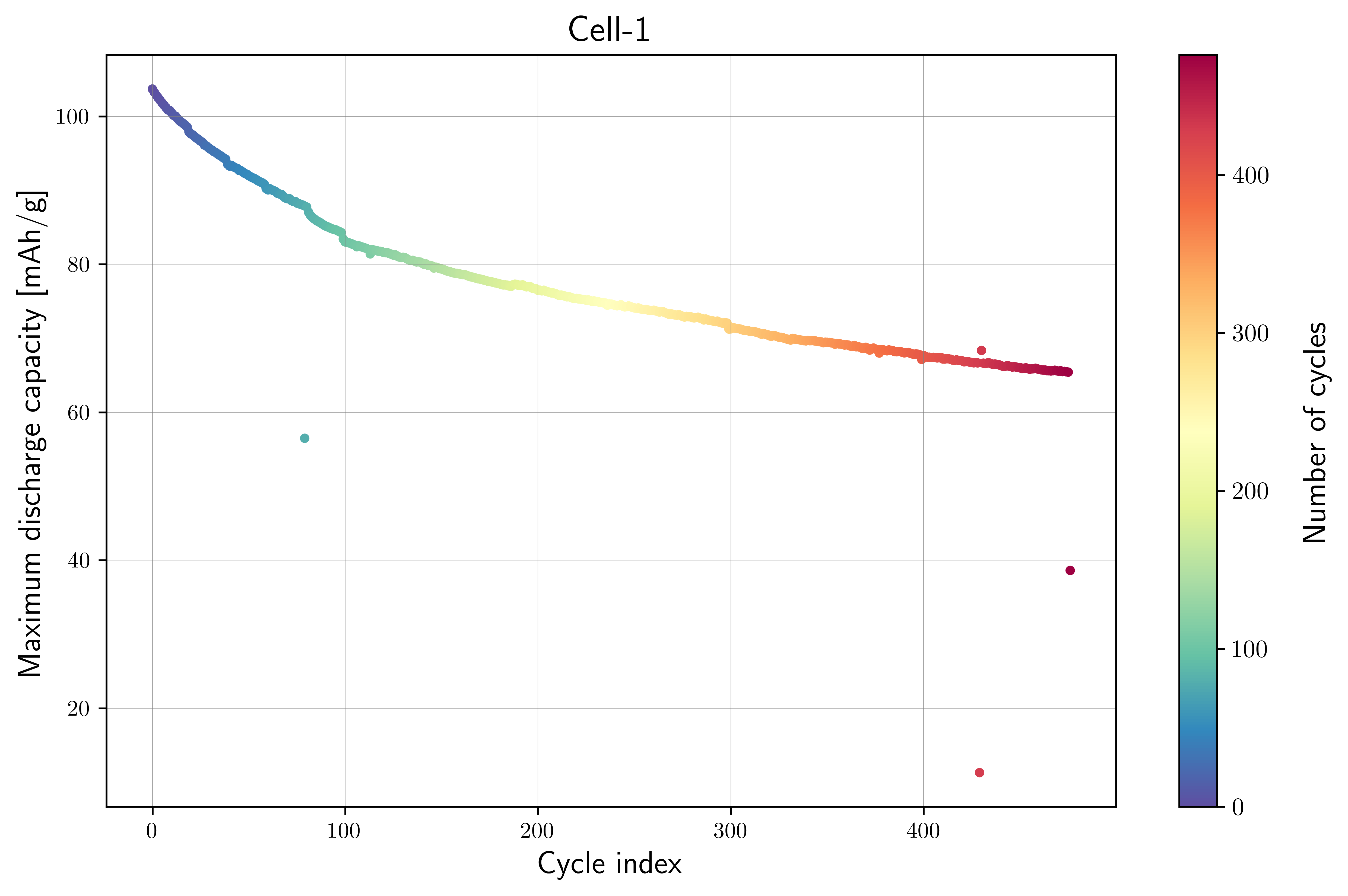
Calculate the maximum discharge capacity per cycle to track capacity degradation over the battery’s cycle life.
Plot the capacity fade curve to visualize the battery’s performance without showing anomaly labels. This represents what the model sees before training.
# Calculate maximum capacity per cycle
max_cap_per_cycle = (
    df_selected_cell_without_labels
        .groupby(["cycle_index"])["discharge_capacity"].max())
max_cap_per_cycle.name = "max_discharge_capacity"

unique_cycle_index = (
    df_selected_cell_without_labels["cycle_index"].unique())

axplot = bviz.plot_cycle_data(
    xseries=unique_cycle_index,
    yseries=max_cap_per_cycle,
    cycle_index_series=unique_cycle_index)

axplot.set_xlabel(
    r"Cycle index",
    fontsize=14)
axplot.set_ylabel(
    r"Maximum discharge capacity [mAh/g]",
    fontsize=14)

axplot.set_title(
    f"Cell-{cell_num}",
    fontsize=16)

output_fig_filename = (
    "cycling_data_without_labels_"
    + selected_cell_label
    + ".png")

fig_output_path = (
    selected_cell_artifacts_dir
    .joinpath(output_fig_filename))

plt.savefig(
    fig_output_path,
    dpi=600,
    bbox_inches="tight")

plt.show()
Step-6: Feature Engineering with Mahalanobis Distance
In the Tohoku dataset, we want to track the sudden and unintended capacity drop over the cycle life. Therefore, the features used are:
cycle_index: Sequential cycle numbermax_discharge_capacity: Maximum discharge capacity per cyclenorm_mahal_dist: Normalized Mahalanobis distance
The Mahalanobis distance is calculated from both the cycle index and the maximum discharge capacity. It captures how far each cycle deviates from the typical distribution of both features. Normalizing the Mahalanobis distance ensures values are between 0 and 1.
Create Xdata for Mahalanobis distance calculation
df_cycle_index = pd.Series(
    unique_cycle_index,
    name="cycle_index")

# Input features for Mahalanobis distance
df_features_per_cell = pd.concat(
    [df_cycle_index,
     max_cap_per_cycle],
    axis=1)

Xfeat = df_features_per_cell.values
Normalized Mahalanobis distance
# Calculate Mahalanobis distance based on cycle_index
# and max_discharge_capacity
cov = EmpiricalCovariance().fit(Xfeat)
mahal_dist = cov.mahalanobis(Xfeat)

df_maha_dist = pd.Series(
    mahal_dist,
    name="mahal_dist")

# Merge calculated mahalanobis distance
df_merge_features = pd.concat(
    [df_features_per_cell,
     df_maha_dist], axis=1)

# Calculate maximum mahal_dist to
# normalize the distance calculation
max_mahal_dist = (
    df_merge_features["mahal_dist"].max())

df_merge_features["norm_mahal_dist"] = (
    df_merge_features["mahal_dist"]/max_mahal_dist)

selected_feature_cols = (
    "max_discharge_capacity",
    "norm_mahal_dist")
Step-7: Baseline Autoencoder (without hyperparameter tuning)
Create a
ModelRunnerinstance with the selected features (max_discharge_capacity,norm_mahal_dist) and the cell label.Build the training input matrix
Xdata(shape: n_cycles × n_features).Instantiate the baseline Autoencoder model using
cfg.baseline_model_param()(default hyperparameters, no tuning).Fit the model, compute probabilistic outlier scores, and extract the predicted outlier cycle indices using a threshold of
0.7.
# Instantiate ModelRunner with selected features and cell_label
runner = ModelRunner(
    cell_label=selected_cell_label,
    df_input_features=df_merge_features,
    selected_feature_cols=selected_feature_cols
)

# create Xdata array
Xdata = runner.create_model_x_input()

# Extract the model configuration for Autoencoder
cfg = hp.MODEL_CONFIG["autoencoder"]

# create model instance without hyperparameter tuning
model = cfg.baseline_model_param()
model.fit(Xdata)

# Predict probabilistic outlier score
proba = model.predict_proba(Xdata)

# Get predicted outlier cycle and score from
# the probabilistic outlier score
(pred_outlier_indices,
 pred_outlier_score) = runner.pred_outlier_indices_from_proba(
    proba=proba,
    threshold=0.7,
    outlier_col=cfg.proba_col
)

print("Predicted anomalous cycles:")
print(pred_outlier_indices)
print("-"*70)
print("Predicted corresponding outlier score:")
print(pred_outlier_score)
To inspect the default hyperparameters of the baseline model:
# Access the default hyperparameters without tuning
baseline_model_param = model.get_params()
pprint.pp(baseline_model_param)
Step-8: Predict Probabilistic Anomaly Score Map
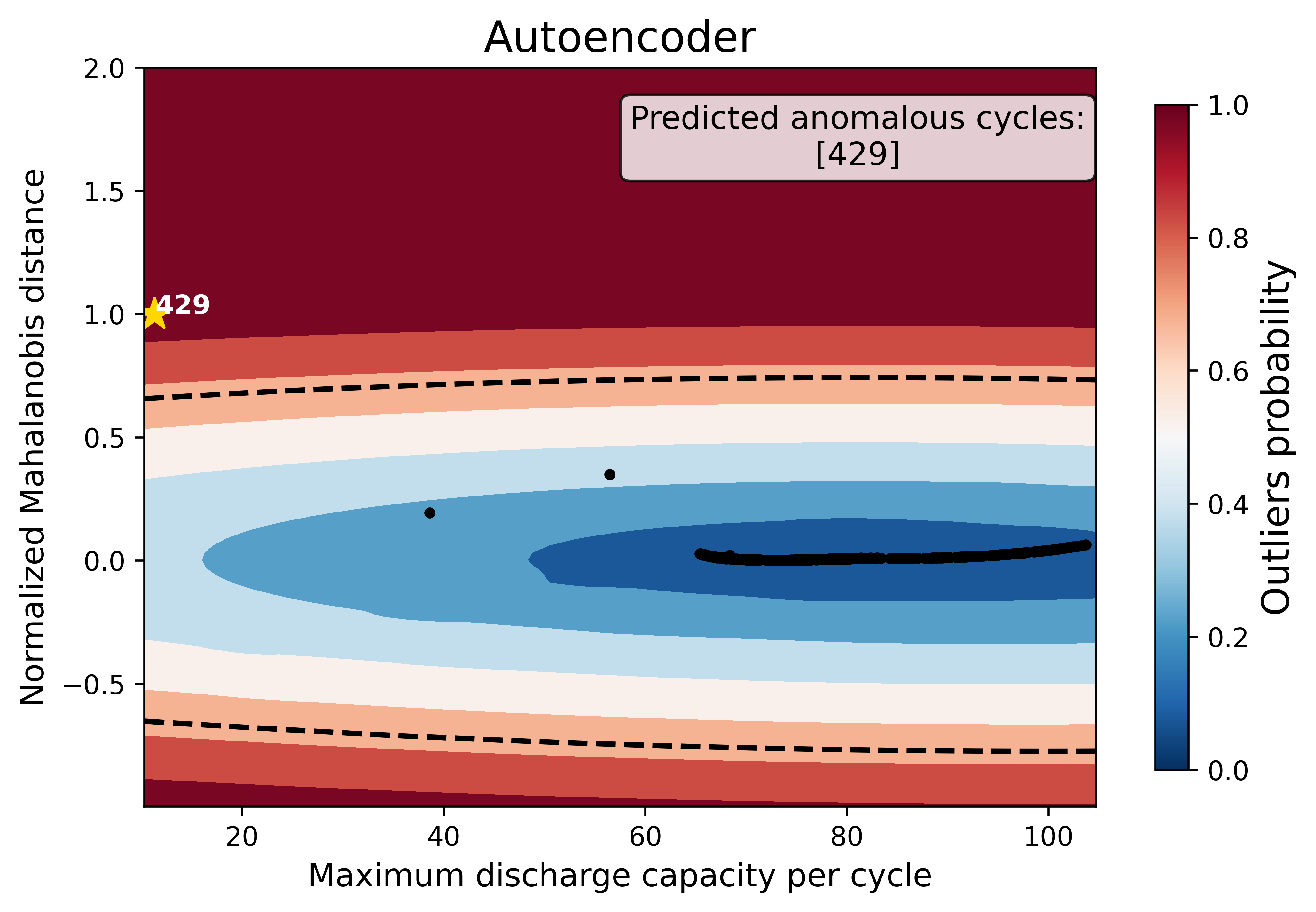
pred_outlier_indicesis a list of cycle indices predicted as anomalous by the baseline Autoencoder model. Using.isin(), the dataframe is filtered to keep only cycles identified as anomalies.A new column,
outlier_prob, is added to store the outlier probability computed by the model, making it easy to track how confidently the algorithm flags each cycle.runner.predict_anomaly_score_mapgenerates a 2D contour map of anomaly scores (outlier probability).For the purpose of comparing different models using the same dataset, the
grid_offset_sizeis set to 1. However, the contour map may not be partially shown for some models. In this case, thegrid_offset_sizecan be increased to a larger number to display the anomaly score map across wider grids.
Predict anomalous cycles
df_outliers_pred = df_merge_features[
    df_merge_features["cycle_index"]
    .isin(pred_outlier_indices)].copy()

df_outliers_pred["outlier_prob"] = pred_outlier_score
Anomaly score map (grid offset = 1)
grid_offset_size = 1

axplot = runner.predict_anomaly_score_map(
    selected_model=model,
    model_name="Autoencoder",
    xoutliers=df_outliers_pred["max_discharge_capacity"],
    youtliers=df_outliers_pred["norm_mahal_dist"],
    pred_outliers_index=pred_outlier_indices,
    threshold=0.7,
    square_grid=False,
    grid_offset=grid_offset_size
)

axplot.set_xlabel(
    r"Maximum discharge capacity per cycle",
    fontsize=12)
axplot.set_ylabel(
    r"Normalized Mahalanobis distance",
    fontsize=12)

output_fig_filename = (
    f"autoencoder_grid_offset_size_{grid_offset_size}_"
    + selected_cell_label
    + ".png")

fig_output_path = (
    selected_cell_artifacts_dir
    .joinpath(output_fig_filename))

plt.savefig(
    fig_output_path,
    dpi=600,
    bbox_inches="tight")

plt.show()
Anomaly score map (grid offset = 50)
grid_offset_size = 50

axplot = runner.predict_anomaly_score_map(
    selected_model=model,
    model_name="Autoencoder",
    xoutliers=df_outliers_pred["max_discharge_capacity"],
    youtliers=df_outliers_pred["norm_mahal_dist"],
    pred_outliers_index=pred_outlier_indices,
    threshold=0.7,
    square_grid=False,
    grid_offset=grid_offset_size
)

axplot.set_xlabel(
    r"Maximum discharge capacity per cycle",
    fontsize=12)
axplot.set_ylabel(
    r"Normalized Mahalanobis distance",
    fontsize=12)

output_fig_filename = (
    f"autoencoder_grid_offset_size_{grid_offset_size}_"
    + selected_cell_label
    + ".png")

fig_output_path = (
    selected_cell_artifacts_dir
    .joinpath(output_fig_filename))

plt.savefig(
    fig_output_path,
    dpi=600,
    bbox_inches="tight")

plt.show()
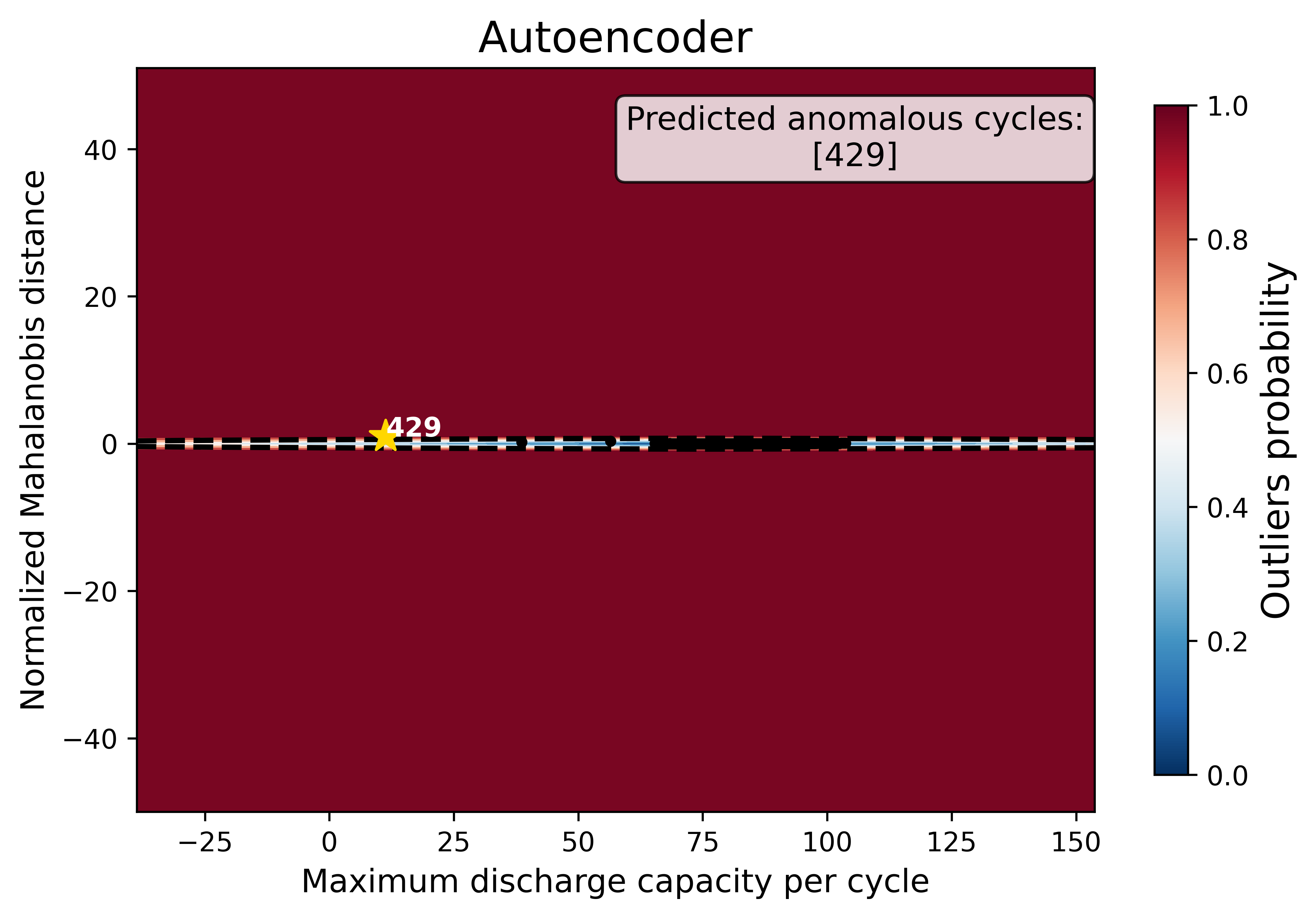
The anomaly score map visualizes the Autoencoder model’s decision boundary in the two-dimensional feature space of maximum discharge capacity and normalized Mahalanobis distance:
Background Heatmap:
Red regions: high anomaly probability (more likely to contain outliers).
Blue/white regions: low anomaly probability (normal cycles).
Dashed Black Contour:
Represents the decision boundary defined by the Autoencoder threshold. Points outside are considered anomalies.
Black Dots:
Represent the majority of normal cycles (inlier data).
Yellow Stars with Labels:
Mark the detected anomalous cycles. Their positions in the 2D feature space highlight where they deviate from typical battery behavior.
Colorbar (right):
Quantifies anomaly probability (0 = normal, 1 = highly anomalous).
Histogram of the anomaly score
outlier_score = model.decision_function(Xdata)

fig, ax = plt.subplots(figsize=(10, 6))

ax.hist(
    outlier_score,
    color="skyblue",
    edgecolor="black",
    bins=25)

ax.grid(
    color="grey",
    linestyle="-",
    linewidth=0.25,
    alpha=0.7)

plt.show()
To access the threshold computed by the baseline model:
# threshold without hyperparameter tuning
model.threshold_
Step-9: Model Performance Evaluation
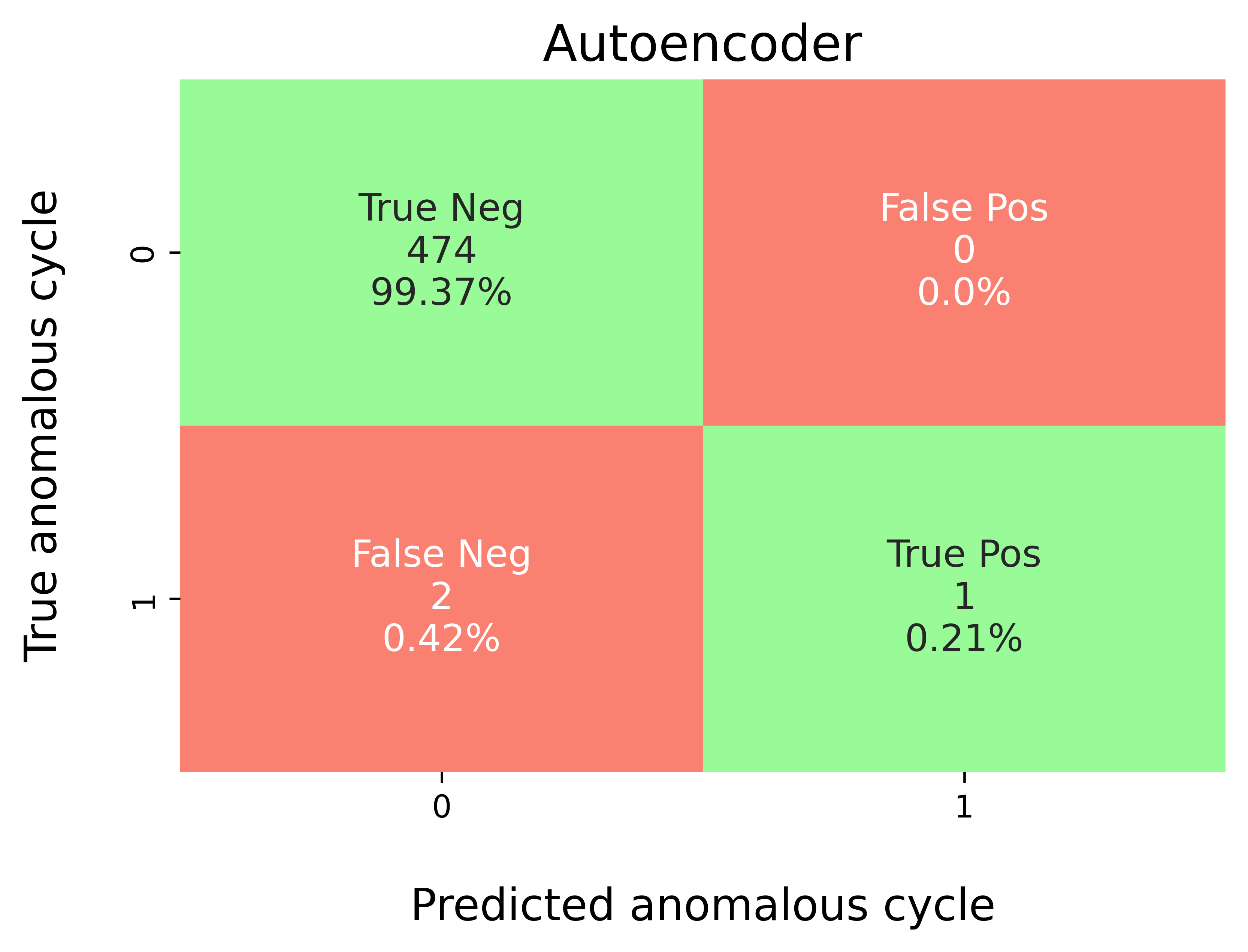
Map predicted outlier indices to the benchmark dataset:
df_selected_cellholds cycle-level records and the ground-truth label (e.g.,outlier= 1 for anomalous cycles, else 0).pred_outlier_indicesis the list of cycle indices flagged by the model.
modval.evaluate_pred_outliers(...)returns a tidy DataFrame with:cycle_index: Cell discharge cycle index.true_outlier: ground truth (0/1).pred_outlier: model prediction (0/1) for the same cycles.
# Compare predicted probabilistic outliers against true outliers
# from the benchmarking dataset
df_eval_outlier = modval.evaluate_pred_outliers(
    df_benchmark=df_selected_cell,
    outlier_cycle_index=pred_outlier_indices)
Confusion matrix
modval.generate_confusion_matrix(...)aggregates counts of:True Negative (TN): predicted 0, truth 0.False Positive (FP): predicted 1, truth 0.False Negative (FN): predicted 0, truth 1.True Positive (TP): predicted 1, truth 1.
axplot = modval.generate_confusion_matrix(
    y_true=df_eval_outlier["true_outlier"],
    y_pred=df_eval_outlier["pred_outlier"])

axplot.set_title(
    "Autoencoder",
    fontsize=16)

output_fig_filename = (
    "conf_matrix_autoencoder_"
    + selected_cell_label
    + ".png")

fig_output_path = (
    selected_cell_artifacts_dir
    .joinpath(output_fig_filename))

plt.savefig(
    fig_output_path,
    dpi=600,
    bbox_inches="tight")

plt.show()
Evaluation metrics
In this study, five different metrics are used to evaluate model performance:
Accuracy: \(\frac{\textrm{TP} + \textrm{TN}}{\textrm{Total prediction}}\)
Precision: \(\frac{\textrm{TP}}{\textrm{TP + FP}}\)
Recall: \(\frac{\textrm{TP}}{\textrm{TP + FN}}\)
F1-score: \(\frac{2(\textrm{Precision}\times \textrm{Recall})}{\textrm{Precision} + \textrm{Recall}}\)
MCC: \(\frac{TP \times TN - FP \times FN}{\sqrt{(TP + FP)(TP + FN)(TN + FP)(TN+FN)}}\)
df_current_eval_metrics = modval.eval_model_performance(
    model_name="autoencoder",
    selected_cell_label=selected_cell_label,
    df_eval_outliers=df_eval_outlier)
Step-10: Export Evaluation Metrics
Export the evaluation metrics to a CSV file for record-keeping and comparison across models.
# Export current metrics to CSV
hyperparam_eval_filepath = Path.cwd().joinpath(
    "eval_metrics_no_hp_tohoku.csv")

hp.export_current_model_metrics(
    model_name="autoencoder",
    selected_cell_label=selected_cell_label,
    df_current_eval_metrics=df_current_eval_metrics,
    export_csv_filepath=hyperparam_eval_filepath,
    if_exists="replace")
Step-11: Visualize Predicted Anomalies
Plot the capacity fade curve with predicted anomalies highlighted.
Annotate the anomalous cycle indices on the plot.
This visualization helps interpret where the model detected sudden capacity drops, which may indicate battery degradation events.
pred_cap_outlier = max_cap_per_cycle[
    max_cap_per_cycle
        .index.isin(pred_outlier_indices)]

# Reset the sns settings
mpl.rcParams.update(mpl.rcParamsDefault)

axplot = bviz.plot_cycle_data(
    xseries=unique_cycle_index,
    yseries=max_cap_per_cycle,
    cycle_index_series=unique_cycle_index,
    xoutlier=pred_cap_outlier.index,
    youtlier=pred_cap_outlier)

axplot.set_xlabel(
    r"Cycle index",
    fontsize=14)
axplot.set_ylabel(
    r"Maximum discharge capacity [mAh/g]",
    fontsize=14)

# Create textbox to annotate anomalous cycle
textstr = '\n'.join((
    r"Predicted cycle index with anomalies:",
    f"{pred_outlier_indices}"))

# properties for bbox
props = dict(
    boxstyle='round',
    facecolor='wheat',
    alpha=0.5)

# first 0.95 corresponds to the left right alignment starting
# from left, second 0.95 corresponds to up down alignment
# starting from bottom
axplot.text(
    0.95, 0.95,
    textstr,
    transform=axplot.transAxes,
    fontsize=12,
    # ha means right alignment of the text
    ha="right", va='top',
    bbox=props)

axplot.set_title(
    f"Cell-{cell_num}: Predicted Anomalies with Autoencoder",
    fontsize=16)

output_fig_filename = (
    "autoencoder_cycling_data_with_pred_outliers_"
    + selected_cell_label
    + ".png")

fig_output_path = (
    selected_cell_artifacts_dir
    .joinpath(output_fig_filename))

plt.savefig(
    fig_output_path,
    dpi=600,
    bbox_inches="tight")

plt.show()
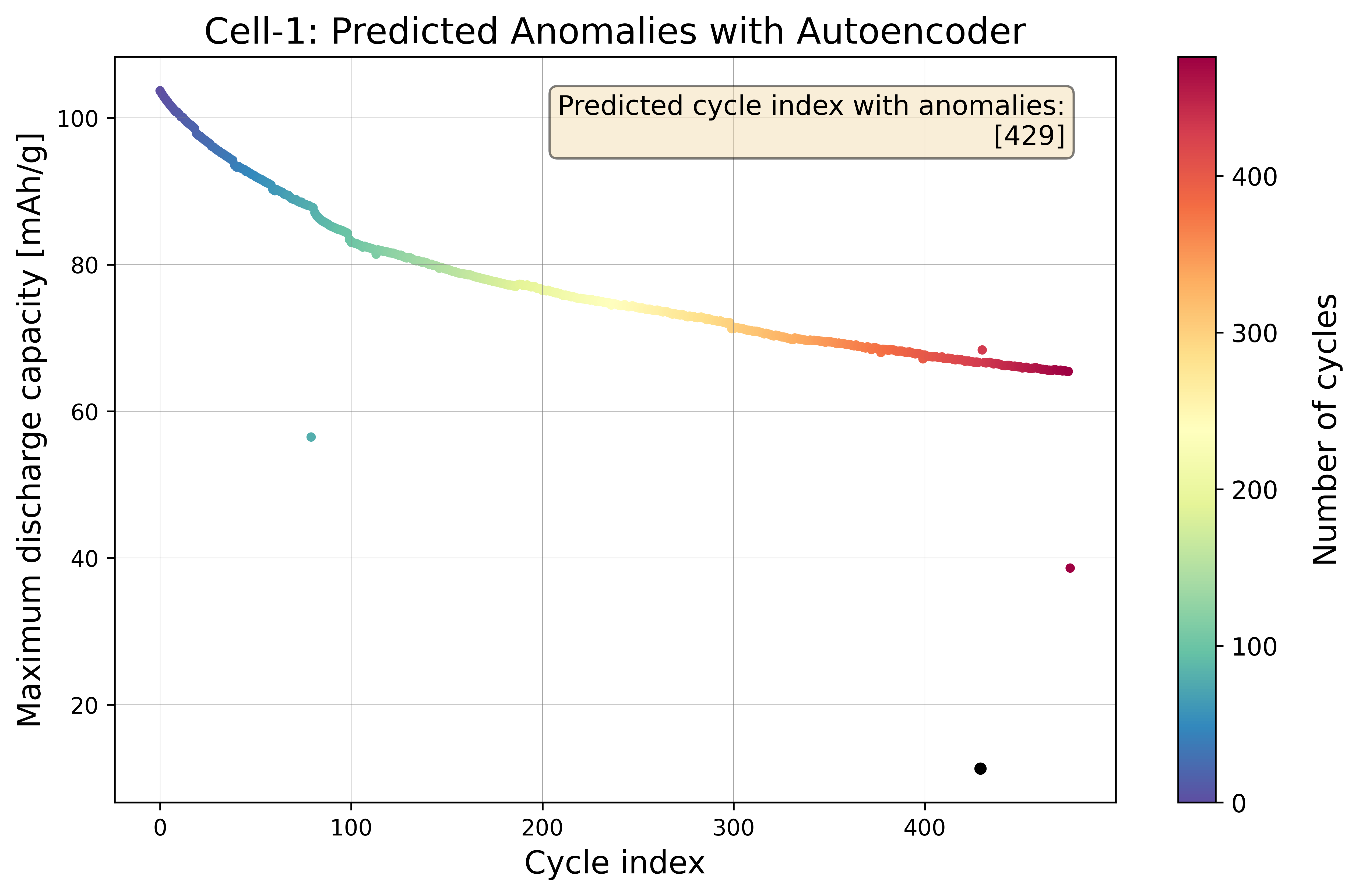
The figure shows the capacity fade curve with predicted anomalies highlighted. These sudden capacity drops indicate potential degradation events in the solid-state battery, which could be caused by:
Electrolyte decomposition
Interface resistance increase
Mechanical damage to the solid electrolyte
Lithium plating
The Autoencoder model detects these point anomalies by reconstructing the input features and flagging cycles with high reconstruction error as anomalies. No hyperparameter tuning is applied in this baseline model, so the results may not be optimal. However, it provides a starting point for understanding how the model identifies anomalous cycles based on the feature space of maximum discharge capacity and normalized Mahalanobis distance.